
Buyer's Premium Billing
Buyers premium is billed twice each month and is based on the date that the affiliate has processed the bidder invoices. Every bidder invoice processed from the 1st - 15th of each month will be compiled and invoiced from K-BID by the 25th of that same month. Similarly, each bidder invoice processed from the 16th - end of the month will be compiled and invoiced on the 10th of the following month.
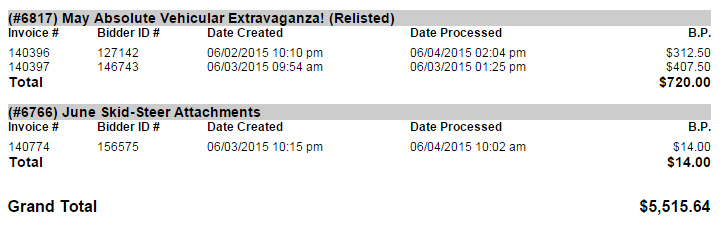
The process date for each invoice can be found on the List Invoices page within the auction. For example, these invoices would be included on the invoice sent out on 6/20/2015.

The following chart explains the billing timeline.
|
Affiliates will be Billed
|
For Invoices Processed
|
Payment Due
|
|---|---|---|
| 10th of Each Month | 16th - the end of prior month | 25th of same month |
| 25th of Each Month | 1st - 15th of current month | 10th of following month |
BP invoices are calculated based on the invoices that have been processed by the affiliate within the billing periods. Invoices are sent via Bill & Pay. Invoices are delivered to affiliates in two ways:
- Email - the email invoice has a link that allows the affiliate to pay the invoice from the email.
- Bill & Pay account - when an affiliate logs into their Bill & Pay account, they will be able to see their current invoice, as well as their invoice/payment history. https://www.billandpay.com/go/kbid
Affiliates are required to activate auto pay in their Bill & Pay account. Activating auto pay means the invoice total will be withdrawn from the affiliate's bank account on the due date listed on the invoice (see Payment Due timelines above).
Affiliate payments returned due to non-sufficient funds is taken very seriously. K-BID charges a $30 bank fee for invoices returned unpaid. Affiliates will immediately lose their publishing privileges and be given one business day to resubmit payment for the outstanding invoice. More than one NSF may result in the termination of the affiliate relationship.
BP Billing Reports
BP billing reports are accessible on the affiliate dashboard and will show you which invoices have been processed for each billing period. It is important to realize that this information will not be included on the invoice that you receive from K-BID, rather you should use this report to verify that the numbers are correct. If you notice a discrepancy with your BP Billing Report and the Invoice that you received from K-BID, please contact us at affiliateservices@k-bidmail.com.
To access your BP Billing Report, navigate to the affiliate dashboard and select the Reports tab.

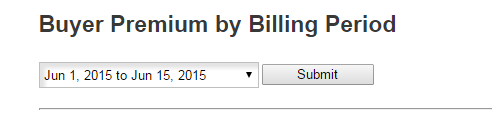
Select Buyers Premium by Billing Period and use the drop down to select the billing period to view.
You will notice that this report will show you every invoice that has been processed within that period, the date which it was processed, and the total amount that you can expect on the bi-monthly invoice from K-BID.
Comments
0 comments
Please sign in to leave a comment.