
Lowering Reserve Prices
Users have the ability to lower a reserve price on an item up until the auction starts to close and in some cases after the auction has ended. Reserves can be lowered to any amount above or at the current bid price but can never be raised.
IMPORTANT: The number one ground rule for this policy: If “Reserve Not Met” was applicable at the time the winning bidder placed his bid, the bidder cannot be held accountable for failing to honor his bid. Affiliates must recognize when bidders become winning bidders by default due to lowering the reserve after the bid was placed, the invoice the bidders receive for the asset is basically just an offer to sell the asset for the bid amount. If the bidder refuses to purchase the asset, there is no penalty, and the invoice should be processed as a No-Sale-Reserve Lowered. The affiliate will be charged a No Sale Doc Admin fee, as well as a Reserve Not Met fee if the winning bidder opts not to purchase a vehicle. Affiliates will be charged a Reserve Not Met fee for non-vehicle lots that fail to meet reserve or if the reserve was lowered after the high bid was placed, and the high bidder opts not to purchase the non-vehicle lot.
Reserves may be lowered to the current bid price within 24 hours of the auction closing. In this scenario the winning bidder will receive an emailed notification and the invoice will be generated on the bidder/affiliate dashboard. It would be recommended to call the bidder and explain that the seller has lowered the reserve price on the item.
Please see the following video and instructions on how to lower a reserve price:
TIP: Watch the video directly in YouTube for a larger screen by hitting the button in the bottom right hand corner.
How to Lower a Reserve
- The Lot List within an auction will display the Reserve and Current Bid prices.
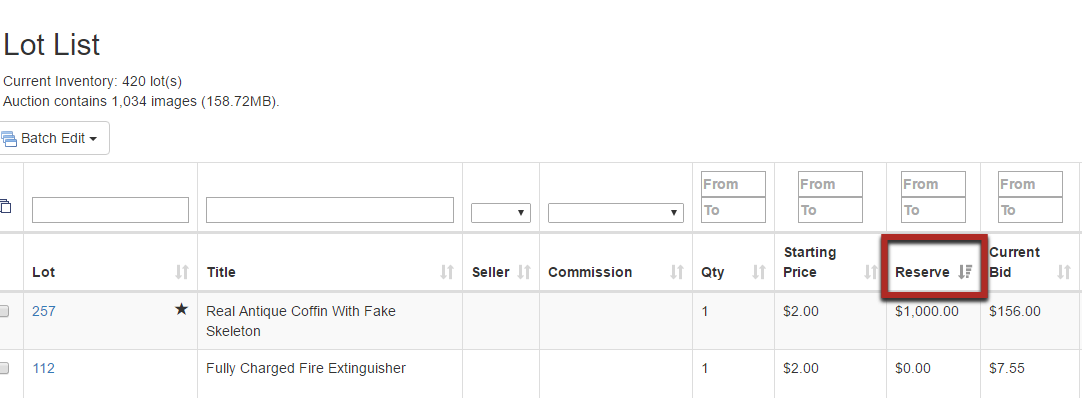
- Select the lot number to edit the item in which the reserve will be lowered.
- Within the Edit Item page, the reserve price may be lowered. Note that the system will not allow a reserve price below $100.
- You can enter any dollar amount below the current reserve price, or you can lower it all the way down to the current high bid by clicking the "Set to Current Bid" button. The high bidder will be emailed a notification that they are the leading bidder on the item.

TIP: Once a reserve price has been adjusted it may not be raised. It is recommended to get direction in writing from your seller before lowering the reserve price on an item.
Comments
0 comments
Please sign in to leave a comment.