
The goal of the lot descriptions and pictures is to accurately identify what is being offered for sale. The more transparent the description and pictures are, the higher the likelihood that there will be a satisfied winning bidder. Descriptions and pictures should be viewed as an opportunity to inform bidders, not to "sell" the asset. Attracting the right bidders (those with a clear understanding of what they are bidding on) leads to successful sales; attracting bidders who believe the asset to be different from what it really is often leads to a No-Sale.
Auction Photos
The value of posting auctions with quality pictures cannot be overstated. Pictures impact bid prices. Since many bidders are unable to physically inspect items prior to bidding, they are completely reliant on the descriptions and pictures to determine if the item will meet their needs. This section provides tips for setting up and taking quality photos for an auction.
Preparation for taking photos:
- Arrange lots according to value. Some bidders expect high value lots to be listed before low value lots.
- Proper Lighting is essential to good pictures. Lights should be positioned behind the photographer and/or to both sides of the item. Pictures taken inside a warehouse, with the outside as a backdrop will look washed out. If possible set up a "photo booth" to take all the pictures to insure each lot has the benefit of proper lighting. Example:
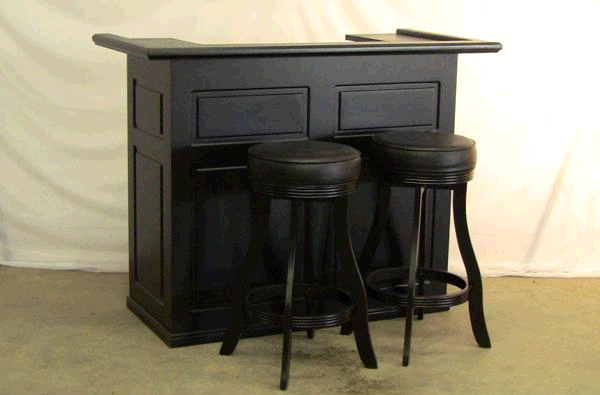
- Staging - Lots should have a backdrop (against a wall/solid color) --- avoid pictures with an open background showing anything other than what is included in the lot. Open backgrounds are distracting and can cause confusion about what exactly is included in the lot.
- Camera Settings - It is important to recognize the camera settings may need to be adjusted based on time of day, background, even asset color. Some common problems that result in poor picture quality:
- Photo is too dark/light - adjust the flash/shut out some of the natural lighting
- Photo is fuzzy or shaky - use a tripod or hold your elbows tight against your body when taking the pictures.
- Photo looks yellow/gray - adjust the white balance feature on the camera.
Suggestions for taking photos:
- The first picture of each lot should be comprehensive – all items/pieces included in the lot should be in this picture. The supplementary pictures can be used to document individual items or aspects of the lot.
- Pictures should be taken at about a 45 degree angle and fairly level with the object. Pictures taken straight on (at a 90 degree angle) or looking down at the lot, make poor pictures.
- Rule of thumb --- take only as many pictures as it takes to tell the story of the item. Each picture should have a purpose - it should add to the information the bidder already knows. Try to identify all the visual aspects of the item that a bidder would want to know.
- Show pictures of any defects or damage to the item. This will allow the bidder to make an informed decision when bidding on an item to determine its value.
- Review the pictures for each lot prior to moving on to the next lot to insure the clarity and quality of the pictures. Retake any picture that reflects poorly on the asset.
- Most lots should be photographed with the camera in the horizontal position. Only in the case of a very tall lot should the camera be positioned vertically.
- Use a table or elevated surface for photos. Pictures of items sitting on the floor look poor and unprofessional.
Photo Specs:
Most modern cameras (including cell phones) default to a MUCH higher resolution (and therefore larger file size) than is necessary or desirable for publishing online. For best results when uploading to K-BID, individual photo files should be smaller than 500KB. Some options for optimizing your file size for online use:
- Check your camera settings. Each camera is different, but in many cases there is a file size or resolution setting (often small, medium large). "Small" is fine!
- Resize the photo using photo editing software. K-BID software automatically scales your photos to display at the smaller of 500 pixels tall or 685 pixels wide, however resizing your photos to close to these dimensions before uploading will create smaller files and speed the upload/publishing process. Do not upload photos SMALLER than these dimensions or they will appear blurry when scaled up.
Marketing tip: The photos in K-BID's paid email marketing option are 250 pixels wide x 200 pixels tall (approximately a 4:3 ratio). If you plan to promote an auction via email blast, it's always helpful to include an overview photo in this orientation and proportions (ex: make your uploaded photo 800p x 600p) so that we don't have to distort your photos to fit the template.
Comments
0 comments
Please sign in to leave a comment.