
There are a number of things that you can do prior to your removal that will help you get prepared for a neat and orderly removal.
- Have a plan for phone calls. People will be calling with questions regarding the auction and items - as much as possible try to have someone available to answer these questions and return phone calls. It is vitally important that customers can reach you or receive a call back to answer any questions.
- Have signs available so winning bidders can easily find the location. Directional signs are a great tool for directing people to the auction site. These can be ordered directly from K-BID.
- Have a plan for traffic and parking. Make sure that you have an entrance and exit plan for winning bidders. Remember that your goal is to get a winning bidder in and out as fast as possible. Make sure to think about the layout of the building to be able to manage traffic as efficiently as possible.
- Start collecting lots based on winning invoices. This will be helpful when bidders start arriving and their lots are already in order for them to remove.
- Print off multiple copies of your invoices and any tax-exempt forms for your state. Many bidders will bring a valid tax-exempt form to the removal but it does not hurt to have some on hand.
- Keep in mind that just because a bidder is from out of state, this doesn't mean they're exempt from sales tax. Your auction removal site is a physical location just like a store or gas station and sales tax applies.
- Get a cash bag and change ready. For larger auctions you may need a couple hundred dollars in smaller bills and change.
- Test your credit card machine to make sure that it is working properly.
- Start calling bidders around halfway through your removal. This is a good reminder and will help you gauge when people will be showing up.
With the help of our experienced affiliates, we've developed a checklist of supplies to have on hand and things to consider when planning for your removal:
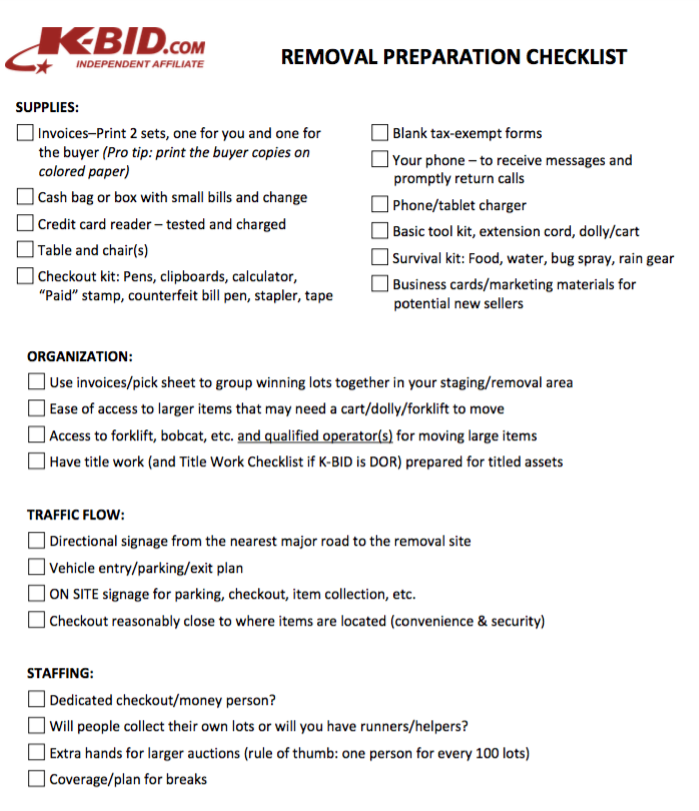
You can download and print it as a PDF as well.
Comments
0 comments
Please sign in to leave a comment.